AI Agents for Business in 2026 and How They Actually Work
There is a good chance you have already interacted with an AI agent today without realizing it. That automated email reply that sounded suspiciously human? An agent. The support chat that resolved your issue without transferring you to a live person? Also an agent. The marketing campaign that personalized itself based on how you browsed a website last Tuesday? You guessed it.
AI agents are not the futuristic concept they were two years ago. In 2026, they represent the fastest-growing segment in enterprise technology, with the global market projected to hit $10.9 billion this year alone. But here is the part most people get wrong. They think agents are just smarter chatbots. They are not. An AI agent can plan, reason, use tools, make decisions, and execute multi-step tasks on its own. That gap between "answering a question" and "completing a job" is what makes agents transformative for businesses of every size.
In this guide, we break down exactly what autonomous AI agents are, how they differ from the tools you already use, and the practical ways businesses deploy them to save time, reduce costs, and scale operations without hiring more people.
What You Will Learn
- What Are AI Agents and Why Should Your Business Care
- AI Agents vs Chatbots vs RPA and Why the Difference Matters
- How AI Agents Actually Work Behind the Scenes
- 7 Proven Ways Businesses Use AI Agents Right Now
- How to Build and Deploy Your First AI Agent
- Multi-Agent Systems and Why They Outperform Single Agents
- AI Agent Governance and Keeping Your Data Safe
- Frequently Asked Questions
What Are AI Agents and Why Should Your Business Care
An AI agent is a software system powered by large language models that can independently perceive its environment, make decisions, and take actions to accomplish specific goals. Unlike traditional software that follows rigid rules, agents operate with autonomy. You give them an objective, and they figure out the steps to get there.
Think of the difference this way. Traditional automation is like programming a GPS with turn-by-turn directions. If the road is blocked, it breaks. An AI agent is more like having a seasoned driver who knows the city. Road blocked? They find an alternate route. Construction ahead? They reroute before you even notice. They adapt, they reason, and they get you to the destination regardless of what changes along the way.
This is why agentic AI matters for businesses in 2026. The technology has moved past simple question-and-answer interactions into genuine task execution. An agent does not just tell you how to process a refund. It actually processes the refund, updates the CRM, sends the confirmation email, and logs the transaction for your accounting team.
Key Insight According to Gartner's 2026 Technology Trends report, by 2028, at least 15% of day-to-day work decisions will be made autonomously by agentic AI systems. The businesses adopting agent technology now are building a significant competitive advantage over those still relying on manual processes.
The Core Capabilities That Define a True AI Agent
Not every AI tool qualifies as an agent. A genuine autonomous AI agent possesses four essential capabilities that separate it from simpler automation tools.
- Perception The agent observes and interprets information from its environment, whether that means reading emails, scanning databases, or monitoring website analytics in real time.
- Reasoning Using large language models, the agent analyzes the situation, weighs options, and determines the best course of action. It does not follow a script. It thinks through the problem.
- Tool Use Agents connect to external systems and APIs to take real actions. They can query databases, update spreadsheets, send messages, create documents, and interact with third-party software like Salesforce, HubSpot, or Slack.
- Memory and Learning Agents retain context across interactions. They remember past conversations, learn from outcomes, and improve their performance over time without manual retraining.
AI Agents vs Chatbots vs RPA and Why the Difference Matters
The most common mistake businesses make is treating AI agents, chatbots, and robotic process automation as interchangeable terms. They are fundamentally different technologies with different strengths, and understanding those differences saves you from investing in the wrong solution.
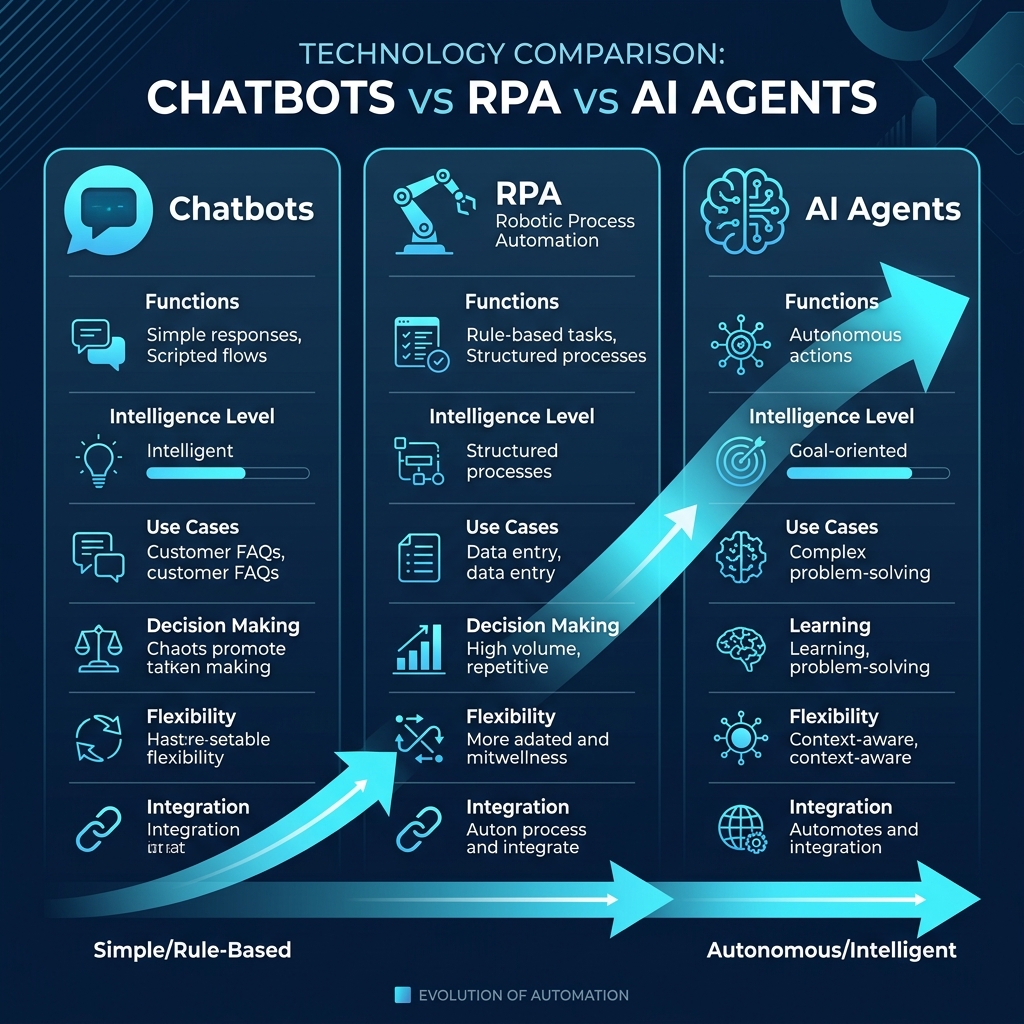
| Capability | Chatbot | RPA Bot | AI Agent |
|---|---|---|---|
| Autonomy | Responds only when prompted | Follows pre-programmed scripts | Plans and acts independently |
| Decision Making | Pattern matching | Rule-based (if/then) | Contextual reasoning with LLMs |
| Handles Unexpected Inputs | Poorly, often breaks | Fails and requires human fix | Adapts and finds alternatives |
| Multi-Step Tasks | No | Yes, but rigid sequences | Yes, with dynamic planning |
| Learning | Static unless retrained | No learning capability | Improves from each interaction |
| Best For | FAQ responses, basic support | Data entry, form filling | End-to-end workflow execution |
The bottom line is that chatbots talk, RPA bots click, and AI agents think and act. For businesses looking to automate complex workflows that require judgment, context awareness, and interaction with multiple systems, agents are the only technology that delivers.
How AI Agents Actually Work Behind the Scenes
Understanding the architecture behind agentic AI workflows helps you make smarter decisions about what to build, what to buy, and where agents fit into your existing technology stack.
The Agent Loop
Every AI agent operates on a continuous loop that mirrors how a skilled human employee approaches a task. The loop runs something like this.
- Receive an objective You tell the agent what you want accomplished. "Process all pending refund requests" or "Qualify the leads from yesterday's webinar."
- Plan the approach The agent breaks the objective into smaller steps. It identifies which tools, data sources, and APIs it needs to complete each step.
- Execute step by step The agent works through its plan, calling external tools, reading documents, querying databases, and generating outputs at each stage.
- Evaluate and adjust After each step, the agent checks whether its action succeeded. If something fails or produces unexpected results, it revises its plan and tries a different approach.
- Report the outcome Once the task is complete, the agent delivers results, logs its actions, and waits for the next objective.
This plan-execute-evaluate loop is what gives agents their power. They do not crash when an API returns an error. They do not freeze when a form field is missing. They adapt in real time, just like a human would.
The Technology Stack Powering Modern AI Agents
Building effective agents requires combining several technologies into a cohesive system.
- Large Language Models (LLMs) The reasoning engine. Models like GPT-4, Claude, and Gemini give agents the ability to understand natural language, analyze context, and generate intelligent responses.
- Vector Databases Long-term memory storage. Tools like Pinecone and Weaviate store knowledge that agents retrieve when they need specific information about your business, products, or customers.
- API Orchestration The connection layer. Frameworks like LangChain and the OpenAI Agents SDK manage how agents interact with external tools, databases, and business applications.
- Observability and Monitoring The safety net. Logging platforms track every decision an agent makes, enabling audit trails, debugging, and continuous improvement.
7 Proven Ways Businesses Use AI Agents Right Now
The theory is interesting, but what matters is how AI agents for business perform in production. Here are seven use cases where agents deliver measurable results today.
1. Customer Support That Never Sleeps
AI support agents handle 80% of customer inquiries without human involvement. They do not just answer questions. They check order status in your fulfillment system, process returns, update shipping addresses, apply discount codes, and escalate only the genuinely complex issues to your human team. Businesses using autonomous support agents report average resolution times dropping from 24 hours to under 3 minutes.
2. Sales Development and Lead Qualification
AI Sales Development Representatives (SDRs) represent one of the fastest-growing agent categories in 2026. These agents research prospects across LinkedIn, company websites, and CRM data. They score leads based on buying signals, craft personalized outreach emails, and schedule meetings directly on your sales team's calendar. Your human reps only talk to prospects who are genuinely ready to buy.
3. Document Processing and Data Extraction
Agents equipped with computer vision and natural language processing read contracts, invoices, resumes, and legal documents. They extract key information, flag discrepancies, and populate your business systems automatically. One accounting firm we worked with reduced their invoice processing time from 4 hours per day to 12 minutes using a custom document agent.
4. Marketing Content and Campaign Management
Marketing agents go far beyond generating blog drafts. They analyze your website analytics, identify content gaps, research trending keywords, write SEO-optimized articles, schedule social media posts, and measure campaign performance. The entire content lifecycle from research to publishing runs autonomously with human oversight at key approval points.
5. Internal Knowledge Management
Every company has critical knowledge trapped in scattered documents, old emails, and the heads of senior employees. Knowledge agents index your entire internal document library, wikis, and communication channels. When any employee asks a question, the agent pulls the exact answer from your company's knowledge base rather than giving a generic response.
6. Code Development and Quality Assurance
Coding agents like Claude Code and Devin handle bug fixes, write unit tests, generate documentation, and review pull requests. Development teams using AI coding agents report 40 to 60 percent faster sprint completion and significantly fewer bugs reaching production.
7. Operations and Supply Chain Optimization
Operations agents monitor inventory levels, predict demand fluctuations, flag supply chain disruptions before they cause delays, and automatically reorder stock when thresholds are crossed. They connect to your ERP, warehouse management system, and supplier portals to maintain a real-time view of your entire operation.
Pro Tip Start with the use case that has the highest volume and the most predictable workflow. Customer support and document processing are ideal first agents because they handle thousands of similar requests with clear success criteria.
How to Build and Deploy Your First AI Agent
You do not need a team of AI researchers to deploy your first agent. The ecosystem has matured significantly, and businesses now have clear paths from idea to production.
Option 1. Use a No-Code Agent Platform
Platforms like Make, Zapier AI, n8n, and Botpress let you build agents visually without writing code. You define the trigger, connect the tools, set the decision logic, and deploy. These platforms work well for straightforward workflows like lead qualification, email triage, and customer FAQ handling. Most businesses can have their first agent live within one to two weeks.
Option 2. Build Custom Agents with Development Frameworks
For complex workflows that require deep integration with proprietary systems, custom development delivers far superior results. Frameworks like LangChain, the OpenAI Agents SDK, and AutoGen provide the building blocks. Your development team or a specialized partner like SRTech designs agents tailored to your exact business logic, security requirements, and scaling needs. At SRTech, we build custom AI agent solutions that integrate directly with your existing CRM, ERP, and communication systems.
Option 3. Leverage Enterprise Agent Platforms
If your organization already uses Microsoft 365, Google Workspace, or Salesforce, each of these platforms now offers native agent builders. Microsoft Copilot Studio, Google Vertex AI Agent Builder, and Salesforce Agentforce 360 allow you to create agents that operate within your existing ecosystem with enterprise-grade security and compliance baked in.
The Implementation Roadmap
Regardless of which approach you choose, follow this proven sequence to maximize your chances of success.
- Define a narrow scope Pick one specific workflow, not an entire department. "Automate webinar lead follow-up" is better than "automate all marketing."
- Map the current process Document every step a human takes today, including the tools they use, the decisions they make, and the exceptions they handle.
- Set measurable success criteria Define what "working" looks like. How many tasks per day? What accuracy rate? What response time?
- Build with guardrails Start with a "human-in-the-loop" model where the agent handles routine tasks but flags edge cases for human review.
- Monitor, measure, and expand Track performance against your success criteria for 30 days. Once the agent proves reliable, remove human checkpoints gradually and expand to adjacent workflows.
Multi-Agent Systems and Why They Outperform Single Agents
The cutting edge of enterprise AI automation in 2026 is not one agent doing everything. It is multiple specialized agents working together as a coordinated team.
Think of it like running a company. You would never hire one person to handle sales, support, marketing, accounting, and IT simultaneously. Instead, you hire specialists who collaborate. Multi-agent systems follow the same principle.
How Multi-Agent Orchestration Works
A multi-agent system assigns different roles to different agents, each optimized for a specific function. A coordinator agent (sometimes called an orchestrator) manages the workflow between them.
For example, imagine a customer submits a complaint on your website. Here is how a multi-agent system handles it.
- Triage Agent reads the complaint, classifies its urgency and category, and routes it to the appropriate specialist agent.
- Research Agent pulls the customer's purchase history, previous support tickets, and account status from your CRM and order management system.
- Resolution Agent analyzes the situation, determines the best resolution (refund, replacement, credit, or escalation), and executes the appropriate action.
- Communication Agent drafts a personalized response to the customer, sends it through the appropriate channel, and schedules a follow-up check-in.
The entire process from complaint to resolution happens in minutes, with each agent handling the part it does best. This is why organizations prioritizing multi-agent orchestration see dramatically better results than those deploying standalone agents.
AI Agent Governance and Keeping Your Data Safe
As agents take on more responsibility, governance becomes critical. You need clear policies defining what agents can access, what actions they can take independently, and when they must defer to a human.
The Essential Governance Framework
- Access Control Define exactly which systems, databases, and APIs each agent can interact with. An HR agent should never access financial records. A sales agent should not modify product pricing.
- Action Boundaries Set clear limits on what agents can do without human approval. For example, allow an agent to process refunds under $100 automatically but require manager approval for anything above that threshold.
- Audit Logging Every action an agent takes should be logged with timestamps, reasoning, and outcomes. This creates a complete audit trail for compliance, debugging, and continuous improvement.
- Bias Monitoring Regularly evaluate agent decisions for patterns of bias or unfairness, especially in hiring, pricing, and customer service scenarios.
- Human Override Always maintain a kill switch. Humans should be able to pause, override, or shut down any agent at any time.
With the EU AI Act and similar regulations taking effect globally, businesses that build governance into their agent architecture from day one avoid costly compliance retrofits later. This is not optional. It is a business requirement.
Frequently Asked Questions About AI Agents
What is the difference between an AI agent and a chatbot?
A chatbot responds to user prompts with pre-scripted or AI-generated text. It waits for input, generates a reply, and stops there. An AI agent goes significantly further. It can autonomously plan multi-step tasks, connect to external tools and databases, and take real actions like updating your CRM, processing a refund, or sending a follow-up email. The simplest way to think about it is that chatbots answer questions while agents complete jobs.
How much do AI agents cost for small businesses?
The investment varies based on complexity. Pre-built agent platforms like Make, Botpress, or Zapier AI range from $100 to $500 per month for small teams. Custom-built agents with specific business logic, proprietary integrations, and enterprise security typically cost between $10,000 and $60,000 for initial development, plus ongoing hosting and maintenance. Most businesses achieve full return on investment within 4 to 6 months through reduced labor costs and dramatically faster task completion.
Are AI agents safe for handling sensitive business data?
Yes, when deployed with proper governance and security controls. Enterprise-grade AI agent platforms support role-based access, end-to-end encryption, SOC 2 compliance, GDPR data handling, and comprehensive audit logging. The critical factor is implementing a clear governance policy that defines exactly what each agent can access, what actions it can take autonomously, and when it must defer to a human. At SRTech, we build governance frameworks directly into every agent deployment.
Can I build an AI agent without coding?
Absolutely. No-code platforms like Make, n8n, Botpress, and Voiceflow let you design agent workflows visually using drag-and-drop interfaces. These platforms handle the underlying AI infrastructure, API connections, and deployment. You focus on defining the business logic and connecting the right tools. For more complex scenarios involving proprietary systems or custom machine learning models, partnering with a development team that specializes in AI agent development accelerates the process significantly.
How long does it take to deploy an AI agent?
Simple agents built on no-code platforms can go live within 1 to 2 weeks. Custom agents with deep system integrations, complex decision logic, and enterprise security requirements typically take 6 to 12 weeks from planning through production deployment. We recommend starting with a narrow-scope pilot agent, proving its value over 30 days, and then expanding to additional workflows.
Ready to Deploy AI Agents in Your Business?
Our AI engineers design and build custom agents that integrate directly with your existing systems. Tell us what you want to automate, and we will show you how agents can make it happen.
Get Your Free AI Agent ConsultationSRTech is a full-service technology agency specializing in AI automation, custom software development, and intelligent agent solutions. With 8+ years of experience serving 200+ global clients, our team builds autonomous systems that transform how businesses operate and grow.