
How AI Automation Transforms Business Operations: A Practical Guide for 2026
Every business owner hits the same wall eventually. Your team spends hours on repetitive data entry, customer queries pile up overnight, and operational bottlenecks silently drain your revenue. You know there's a better way — and there is. AI automation isn't a buzzword reserved for Fortune 500 companies anymore. It's a practical, accessible toolkit that businesses of every size use right now to cut costs, eliminate errors, and free their teams to focus on work that actually moves the needle.
In this guide, we break down exactly how intelligent automation works, which business processes you should automate first, and the real-world ROI you can expect. Whether you're exploring AI workflow automation for the first time or looking to scale existing systems, you'll walk away with a clear roadmap to transform your operations.
What You'll Learn
- What Is AI Automation and Why Does It Matter?
- Which Business Processes Should You Automate First?
- AI Automation vs. Traditional RPA: What's the Difference?
- The Real ROI of Implementing AI Automation
- How to Implement AI Automation: A Step-by-Step Roadmap
- 5 Common Mistakes That Kill AI Automation Projects
- AI Automation Trends Shaping 2026 and Beyond
- Frequently Asked Questions
What Is AI Automation and Why Does It Matter for Your Business?
AI automation combines artificial intelligence technologies — including machine learning, natural language processing (NLP), and computer vision — with workflow automation to handle complex business tasks that traditional software simply can't manage. Unlike basic rule-based automation that follows rigid "if-this-then-that" logic, AI-powered systems learn from data, adapt to new patterns, and make decisions with minimal human intervention.
Here's why this distinction matters: traditional automation handles predictable, structured tasks. AI automation handles the messy, unstructured reality of modern business — reading customer emails, extracting data from scanned invoices, qualifying sales leads based on conversation context, or predicting inventory shortages before they happen.
Key Insight: According to McKinsey's 2025 Global AI Survey, companies that deploy intelligent automation across three or more business functions report 20-30% higher profit margins than competitors who rely on manual processes alone.
The Core Technologies Behind Intelligent Automation
Modern business process automation draws on several interconnected AI disciplines:
- Machine Learning (ML): Algorithms that analyze historical data to predict outcomes — like forecasting customer churn or optimizing pricing strategies.
- Natural Language Processing (NLP): Enables AI systems to understand, interpret, and generate human language — powering chatbots, email classification, and sentiment analysis.
- Robotic Process Automation (RPA): Software bots that mimic human actions (clicking, typing, copying data) to automate repetitive digital tasks across applications.
- Computer Vision: AI that processes and analyzes visual information — used in document scanning, quality inspection, and image recognition.
- Generative AI: Large language models that create content, summarize reports, draft communications, and power conversational AI agents.
When these technologies work together — what industry analysts call hyperautomation — they create end-to-end automated workflows that dramatically reduce the need for human involvement in routine operations.
Which Business Processes Should You Automate First?
The biggest mistake companies make with AI automation is trying to automate everything at once. Start with processes that are high-volume, repetitive, and rule-heavy — these deliver the fastest return on investment.
High-Impact Automation Opportunities
1. Customer Support and Service
AI-powered chatbots and virtual assistants handle up to 80% of routine customer inquiries without human intervention. They provide instant 24/7 responses, route complex issues to the right team member, and learn from every interaction to improve over time. Businesses using AI customer support automation report average response times dropping from hours to seconds.
2. Invoice Processing and Accounts Payable
Cognitive document processing uses computer vision and NLP to extract data from invoices, receipts, and purchase orders — regardless of format. What used to take an accounts team hours of manual data entry now happens in minutes with 99%+ accuracy.
3. Lead Qualification and Sales Pipeline
Machine learning models analyze prospect behavior, engagement signals, and demographic data to score and qualify leads automatically. Your sales team focuses exclusively on high-intent prospects while AI nurtures early-stage leads through personalized email sequences.
4. Email Marketing and Campaign Management
AI-driven marketing automation goes far beyond scheduled sends. It predicts the optimal send time for each recipient, generates personalized subject lines, segments audiences dynamically, and A/B tests content automatically to maximize open rates and conversions.
5. Data Entry and Report Generation
Instead of having team members manually compile data across spreadsheets and platforms, AI automation pulls data from multiple sources, validates it for accuracy, and generates formatted reports on schedule — or on demand.
Pro Tip: Audit your team's weekly tasks. Any process that takes more than 2 hours per week and follows a predictable pattern is a strong candidate for AI automation. Start with one process, prove the ROI, then expand.
AI Automation vs. Traditional RPA: What's the Difference?
Many business owners confuse robotic process automation (RPA) with AI automation. While they're related, the capabilities gap is significant — and understanding it helps you make smarter investment decisions.
| Feature | Traditional RPA | AI Automation |
|---|---|---|
| Data Type | Structured only | Structured + Unstructured |
| Decision Making | Rule-based (if/then) | Intelligent (learns from data) |
| Adaptability | Breaks when processes change | Adapts to variations automatically |
| Use Cases | Data entry, form filling | Customer interaction, prediction, content generation |
| Setup Complexity | Moderate | Higher initially, lower maintenance |
| Long-term ROI | Good | Excellent (compounds over time) |
The bottom line: RPA excels at straightforward, repetitive tasks. AI automation handles the complex, judgment-based processes that truly transform business operations. The most effective approach? Combine both in a hyperautomation strategy where RPA bots handle the predictable tasks while AI manages the intelligent decision-making layer.
The Real ROI of Implementing AI Automation
Let's cut through the hype and talk numbers. What does AI automation actually deliver in measurable business outcomes?
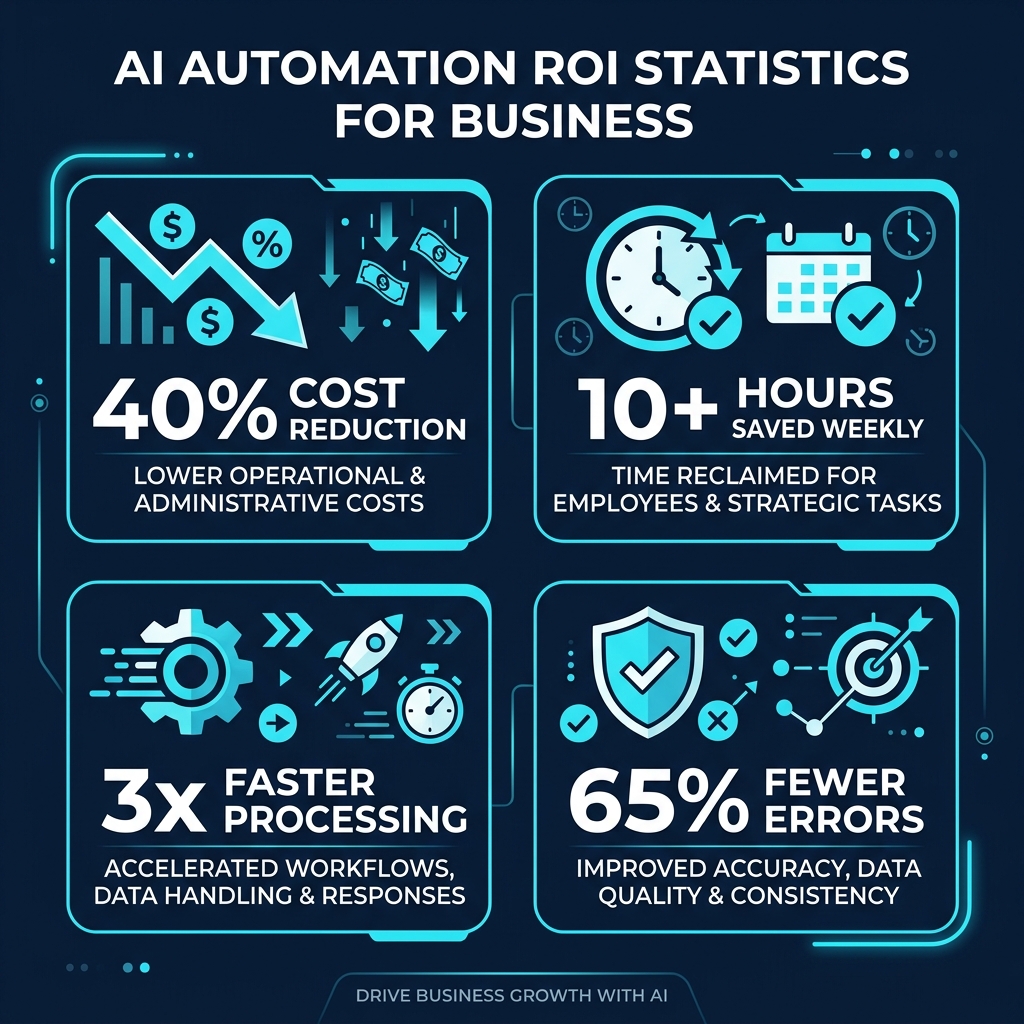
Cost Reduction That Compounds Over Time
Businesses implementing AI-powered workflow automation typically see 30-40% reduction in operational costs within the first year. This isn't a one-time saving — it compounds. As AI models process more data, they become more accurate, handle more edge cases, and require less human oversight. Your cost per transaction decreases month over month.
Time Savings Your Team Actually Feels
The average knowledge worker spends 4.5 hours per day on tasks that AI can partially or fully automate — according to research by Asana's Work Innovation Lab. When you eliminate even half of that manual workload, you unlock 10+ hours per employee per week for strategic, revenue-generating activities.
Error Rates Drop Dramatically
Human data entry carries a typical error rate of 1-4%. AI-driven document processing reduces that to under 0.1%. For businesses processing thousands of invoices, orders, or records monthly, that accuracy improvement directly translates to fewer costly mistakes, better compliance, and stronger customer trust.
Scalability Without Proportional Headcount Growth
This is the strategic advantage most businesses underestimate. AI automation lets you handle 5x the volume without hiring 5x the staff. Whether your customer base doubles or your transaction volume spikes during seasonal peaks, automated systems scale elastically — without burnout, overtime, or recruitment costs.
How to Implement AI Automation: A Step-by-Step Roadmap
Successful AI implementation follows a structured approach. Rushing into tool selection before understanding your workflow gaps leads to wasted budgets and abandoned projects. Here's the proven framework we use with our clients at SRTech.
Phase 1: Audit and Identify (Weeks 1-2)
Map every process your team handles daily. Document the time each task consumes, the error frequency, and the cost per completion. Look for bottlenecks where work stalls waiting for human action. These bottlenecks represent your highest-ROI automation targets.
Phase 2: Prioritize and Plan (Weeks 2-3)
Score each process on three criteria: volume (how often it occurs), complexity (how many steps involved), and impact (what happens when it fails). Start with high-volume, moderate-complexity processes — they deliver quick wins that build organizational confidence in automation.
Phase 3: Build and Integrate (Weeks 3-8)
Develop or configure your automation solution. This might involve integrating pre-built AI tools with your existing CRM, ERP, or project management systems — or building custom machine learning models for industry-specific workflows. At SRTech, we specialize in creating tailored AI automation solutions that integrate seamlessly with your existing technology stack.
Phase 4: Test and Refine (Weeks 8-10)
Run your automation in parallel with existing manual processes. Compare accuracy, speed, and output quality. Collect edge cases where the AI struggles and use them to improve the model. This "shadow deployment" approach ensures zero disruption to live operations.
Phase 5: Deploy and Scale (Week 10+)
Launch the automated process, monitor performance metrics, and gradually expand to adjacent workflows. Document everything — the processes that worked, the integrations that required tuning, the metrics that improved. This knowledge accelerates your next automation project.
5 Common Mistakes That Kill AI Automation Projects
After helping dozens of businesses implement intelligent automation, we've identified the patterns that consistently derail projects. Avoid these, and your chances of success increase dramatically.
- Automating broken processes: If your current workflow is inefficient, automating it just makes it efficiently broken. Fix the process first, then automate the improved version.
- Ignoring change management: Your team needs to understand why automation helps them, not replaces them. Invest time in training and communication — adoption rates jump 3x when employees feel included in the transformation.
- Choosing tools before defining requirements: "We need AI" isn't a requirement. Define the specific outcome you want — "reduce invoice processing time from 4 hours to 20 minutes" — then evaluate tools against that benchmark.
- Underestimating data quality: AI models are only as good as the data they learn from. If your CRM is full of duplicates, your lead scoring model will produce garbage predictions. Clean your data before building automation.
- Skipping the measurement framework: If you can't measure the impact, you can't prove the value. Establish baseline metrics before deployment and track improvements consistently.
AI Automation Trends Shaping Business in 2026 and Beyond
The intelligent automation landscape evolves rapidly. Here are the trends we see driving the next wave of business transformation:
Agentic AI Workflows
Autonomous AI agents that don't just respond to commands — they proactively identify problems, gather information, execute multi-step tasks, and report results. Think of them as digital employees that work 24/7, learning and improving with each task they complete.
No-Code and Low-Code AI Platforms
Building custom AI automation no longer requires a team of data scientists. Visual workflow builders with drag-and-drop AI components let business teams create sophisticated automation without writing code. This democratization accelerates adoption across industries.
Predictive Operations Management
AI systems that predict operational issues before they occur — from supply chain disruptions to equipment failures to customer churn signals. Predictive analytics shifts businesses from reactive firefighting to proactive decision-making.
AI Governance and Ethical Automation
As AI handles more business-critical decisions, governance frameworks become essential. Expect increased focus on explainable AI, bias detection, data privacy compliance, and audit trails for automated decision-making processes.
Frequently Asked Questions About AI Automation
How much does AI automation cost for a small business?
Costs vary widely based on scope and complexity. Simple workflow automations using no-code platforms like Zapier or Make start at $50-200/month. Custom AI solutions with machine learning models — such as intelligent document processing or predictive analytics systems — typically range from $5,000-$50,000+ for development. The important metric isn't the cost; it's the ROI. Most small businesses see positive returns within 3-6 months of implementation.
What business processes can AI automate?
AI can automate virtually any process that involves data processing, pattern recognition, or repetitive decision-making. The most common use cases include customer support (chatbots, ticket routing), data entry and document processing, email marketing campaigns, invoice and payment processing, lead qualification and scoring, social media management, inventory forecasting, and report generation.
How long does it take to implement AI automation?
Basic workflow automations using pre-built tools can go live within 1-2 weeks. More complex AI integrations involving custom machine learning models, multi-system integrations, or enterprise-wide automation typically take 2-4 months from planning through full deployment. We recommend a phased approach — start with a pilot project, prove the value, then scale across the organization.
Will AI automation replace my employees?
AI automation replaces tasks, not people. It eliminates the repetitive, low-value work that drains your team's energy and frees them to focus on creative problem-solving, relationship building, and strategic thinking — the work that humans do best. Companies that frame automation as a tool for employee empowerment consistently see higher adoption rates and better outcomes.
Do I need technical expertise to implement AI automation?
Not necessarily. No-code AI platforms make basic automation accessible to anyone with business process knowledge. However, for custom AI solutions that require machine learning model development, API integrations, or enterprise-grade security — partnering with an experienced AI automation agency like SRTech significantly reduces risk and accelerates time-to-value.
Ready to Automate Your Business Operations?
Our AI engineers analyze your workflows and identify the highest-ROI automation opportunities — at no cost. Get your free automation audit today.
Get Your Free AI Automation AuditSRTech is a full-service technology agency specializing in AI automation, custom software development, and digital transformation solutions. With 8+ years of experience serving 200+ global clients, our team delivers intelligent systems that drive measurable business growth.